# Overview
### Instructions for one minute tryout
1. Install [XCelsior spreadsheet extension](https://cutt.ly/xePHXz5E)
2. Copy [**this template**](https://cutt.ly/iePHX74y) as a new one and try to experience XCelsior to boost your efficiency in google spreadsheet.
### What is XCelsior AI: GPT for Sheets™ ?
**XCelsior AI: GPT for Sheets™ with Gemini, OpenAI** Boost your efficiency with AI-driven insights and confident answers in Google Sheets™ using ChatGPT and Gemini.
XCelsior AI transforms Google Sheets™ with advanced AI, integrating external information seamlessly. Leverage community-contributed prompts and functions for enhanced insights and automation. Analyze, summarize data faster and more accurately with XCelsior AI, your ultimate tool for smarter, data-driven insights.
Watch this video to learn how to use XCelsiorAI to boost your efficiency and streamline your workflow:
{% embed url="" %}
### Why choose XCelsior AI: GPT for Sheets™ ?
* **✅** [**Automated Workflows**](/features/automation)**: Automate tasks and create custom workflows, increasing productivity to 10x.**
* **💎** [**Accurate Answers**](/features/accurate)**: Our confidence checker reduces errors, saving hours every day.**
* **🔒** [**Secure Data Encryption**](/features/secure)**: Encrypt files to keep your data private and not used for training.**
* **⚡** [**Instant Insights**](/features/instant-insight)**: Analyze and summarize findings in seconds, and generate reports with one click.**
* **🌐** [**Versatile Data Handling**](/features/versatile-data-handling)**: Easily work with text files, PDFs, images, etc.**
* **📚** [**Diverse Prompts and Function**](/features/diverse-prompt)**: Access a library of community-contributed tools for tasks like data analysis, summarization, and reporting.**
**How to use XCelsior to boost your efficiency on Google Sheets™ :**
XCelsior introduces a suite of powerful functions designed to elevate your data handling experience. These features are crafted to make your spreadsheet tasks more intuitive and efficient:
* **Ask GPT Question**: Call GPT for answers to your queries with `XASK()`. For example:
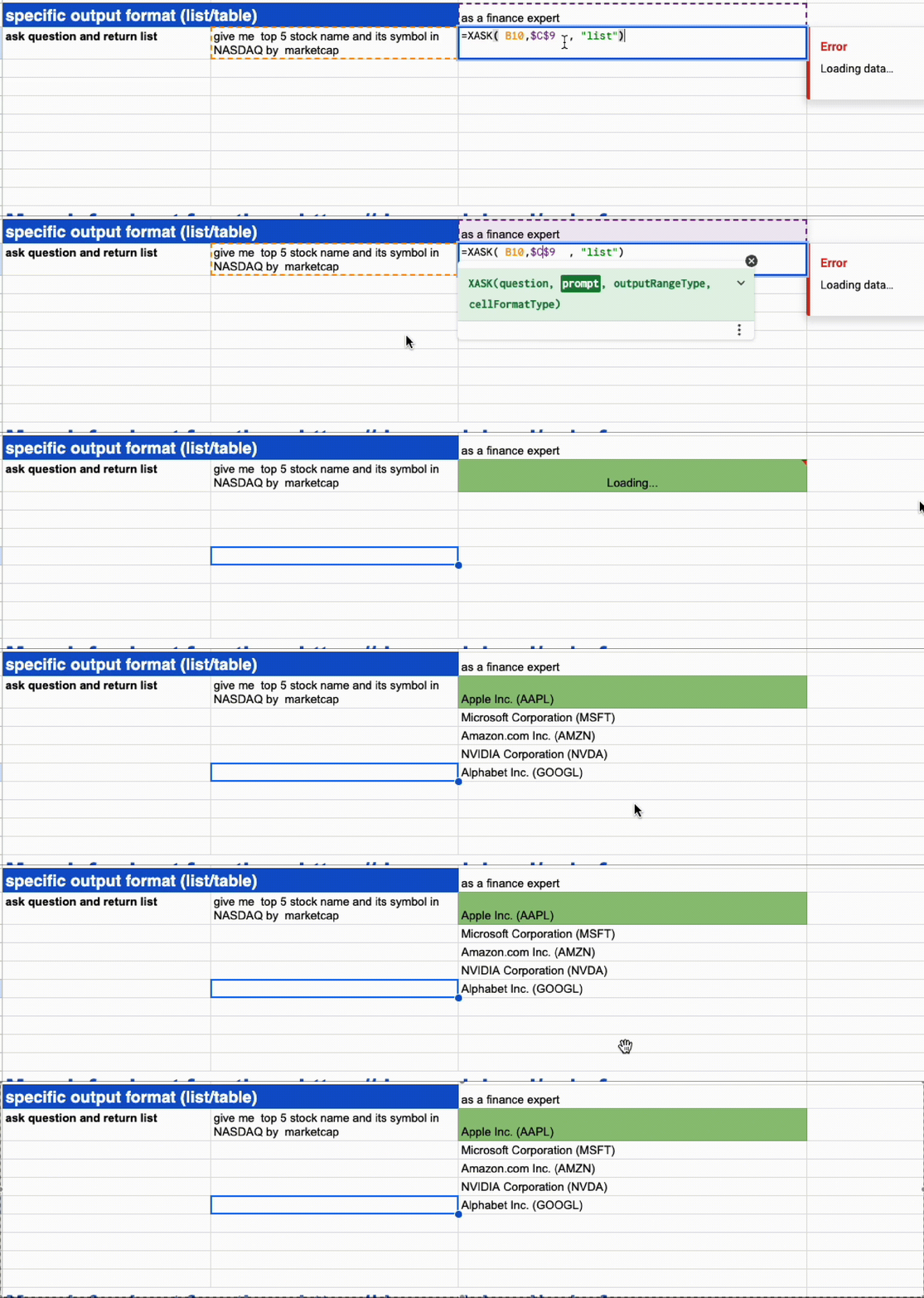
* XASK(question ,prompt, "list"): ask question with prompt, return a list
* XASK(question ,prompt, "table"): ask question with prompt, return a table
* **Ask by specify datasource**: Use `XFETCH()`to find answer from specify datasource.
* **AI Table Merging**: Seamlessly merge two tables into one with `XMERGE()`.
* **Advanced Custom Functions**: Use `XDEF()` and `XCALL()`. to define and call your custom functions with specified prompts.
{% embed url="" %}
#### Quick Glance
Below you'll find screenshots and brief descriptions to help you get started quickly.
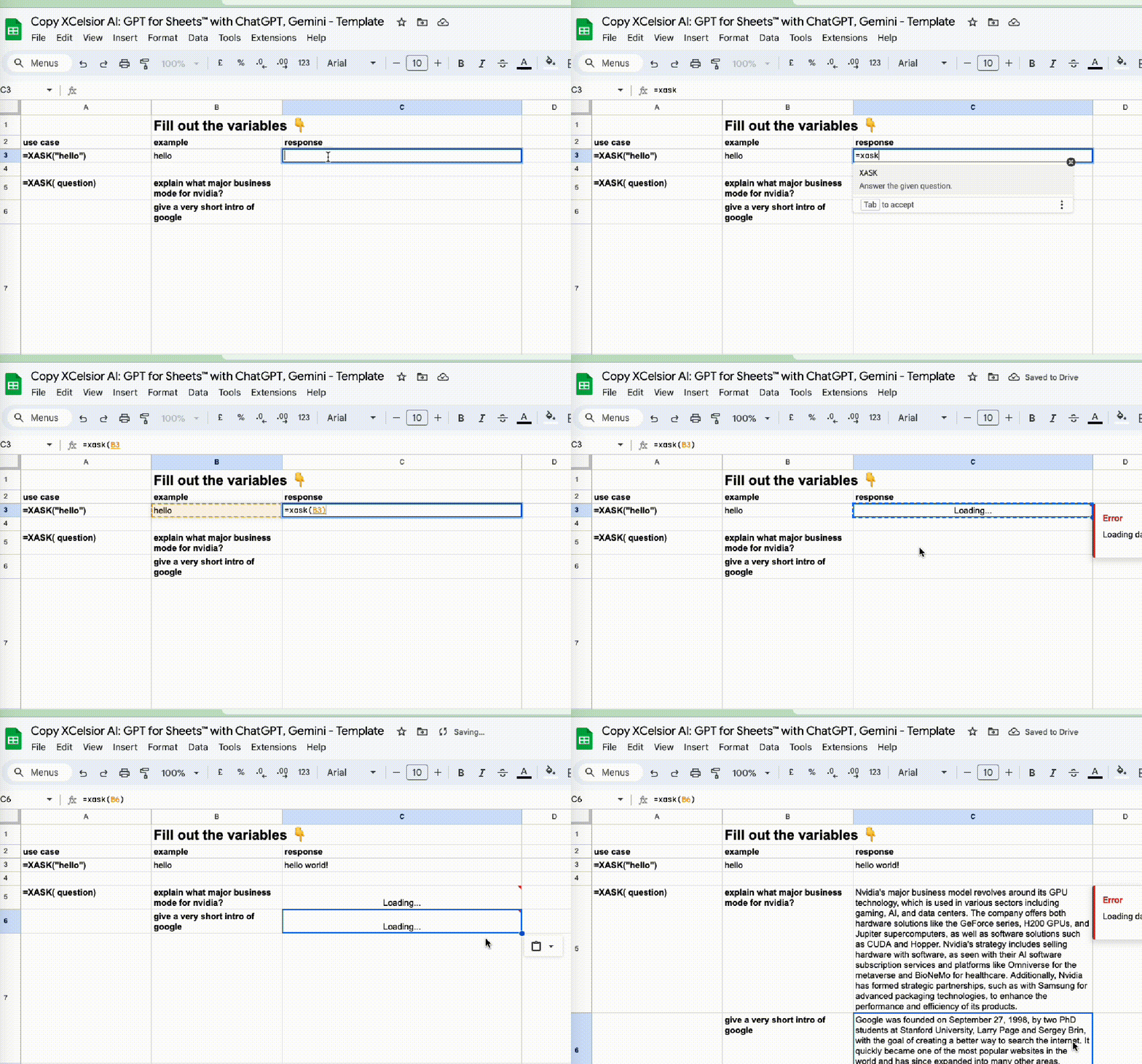
* use simple answer function
{% embed url="" %}
* use simple answer with list return
* use simple answer with table return

* use XFETCH with Google search as a source: `xc://source?search=google`

#### Use Cases:
* **Data Analysis**: Analyze, summarize data with ease.
* **Data Cleaning**: Normalize and clean data formats (e.g., names, addresses, emails).
* **Classification**: Categorize and classify large datasets efficiently.
* **SEO and Marketing**: Optimize SEO metadata, ad copy, and manage product catalogs.
* **Text Manipulation**: Change text cases, split content, and translate text.
* **Automation**: Automate repetitive tasks to save time and reduce errors.
XCelsior is designed to bring the power of AI to your spreadsheets, making it easier than ever to manage and analyze your data. Whether you're a data scientist, marketer, or business professional, XCelsior is your go-to tool for smarter data handling.
#### Learn more & Get started:
* [**Install the Spreadsheet Extension**](https://workspace.google.com/marketplace/app/xcelsior_ai_gpt_for_sheets_with_gemini_o/953720034790)
* [**Video Tutorials**](https://www.youtube.com/playlist?list=PLDqAtO0j3Pzd8RL0srZByvr0S_bNh0Tha)
* [**Website**](https://xcelsior.ai)
* [**User Guide**](https://doc.xcelsior.ai/getting-started)
* [**Privacy Policy**](https://doc.xcelsior.ai/legal/privacy-policy)
* [**Terms of Service**](https://doc.xcelsior.ai/legal/privacy-policy)
# Getting Started
To install the XCelsior AI extension for Google Sheets™, follow these steps:
1. **Install Instructions**: For step-by-step installation instructions, refer to our [installation guide](/tutorials/installation).
## Your First "Hello World" Function
To see XCelsior AI in action, try this simple example:
1. Open a new or existing Google Sheets™ document.
2. Click on a cell and type:
```
=XASK("hello")
```
3. Press Enter. You should receive a response from the server within 3-5 seconds.
## Explore More Scenarios
XCelsior AI can do much more than just respond to simple queries. Explore various use cases and see how you can leverage AI to enhance your productivity:
* Check out our [use case presentation](https://docs.google.com/spreadsheets/d/168DWlbtSNYIaYmWWD_RrMG3xanNHOJFqOZeS8UG7RQw/edit?gid=0#gid=0) to get inspired and learn more about the possibilities.
***
With XCelsior AI, you can transform your Google Sheets™ experience by integrating powerful AI capabilities. Start exploring today!
# Features
# Automation
# Accurate Answers
Our confidence checker reduces errors, SAVING HOURS EVERY DAY.
* support tracking multiple answer source by their confidence level

* support tracking multiple answer source by relative chunk

# Secure Data Encryption
# Instant Insights
## XSUMMARIZE:
Analyze and summarize findings in seconds, and generate reports with one click.
## XANALYSIS(TBD)
# Versatile Data Handling
Easily work with text files, PDFs, images, etc.
# Diverse Prompts and Function
* support user defined function
{% embed url="" %}
{% embed url="" %}
# Pricing
Please visit [our pricing page](https://xcelsior.ai/#pricing).
# Tutorials
# Installation
Welcome to the tutorial on how to install `XCelsior AI: GPT for Sheets™ with Gemini, OpenAI` add-on in Google Sheets! Follow these simple steps to enhance your spreadsheet experience with the powerful features of XCelsior.
## Step 1: Install the Add-On
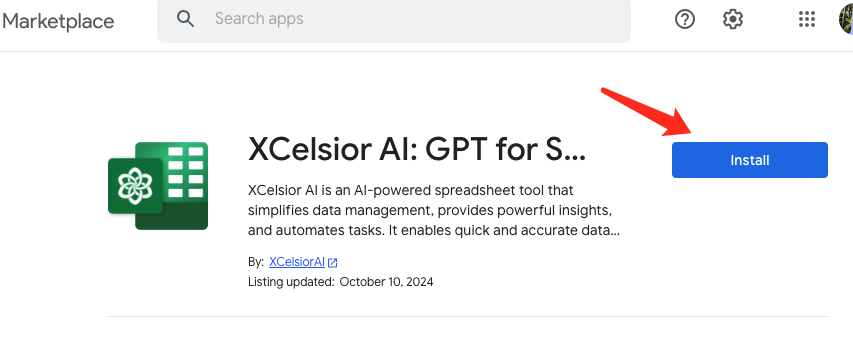
1. Click [XCelsior spreadsheet extension](https://cutt.ly/xePHXz5E) to go directly to the XCelsior add-on page in the Google Workspace Marketplace.
2. Click the **Install** button.
3. A dialog box will appear asking for permission to install the add-on. Click **Continue**.
4. Select the Google account you want to use with the add-on.
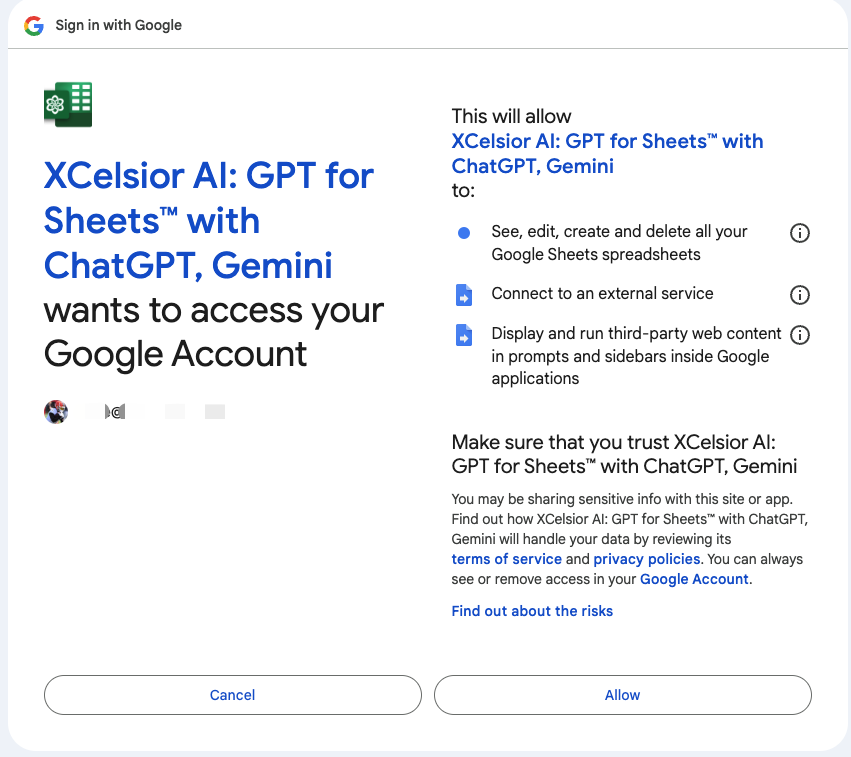
5. Review the permissions requested by XCelsior and click **Allow** to grant the necessary permissions.
6. After granting permissions, the installation process will complete, and a confirmation message will appear. Click **Done** to finish the installation.
## Step 2: Access and Use XCelsior
1. Open a new or existing Google Sheets document.
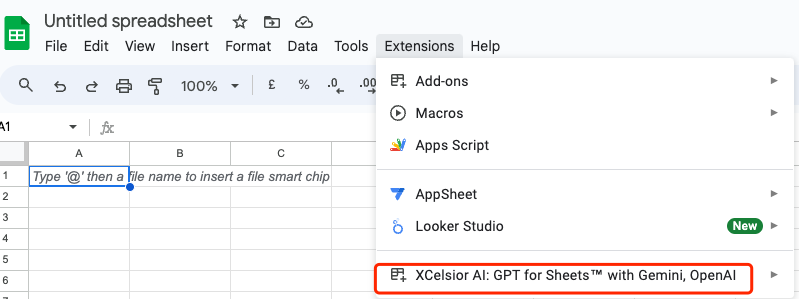
2. Click on the **Extensions** menu at the top of the page.
3. You should now see **XCelsior** listed in the dropdown menu.
4. Click on **XCelsior** to access its features and start using the add-on to enhance your spreadsheet workflows.
## Instructions for One Minute Tryout
For a quick tryout, click [**this template**](https://cutt.ly/iePHX74y). This protected sheet template allows you to make a copy and experience XCelsior's capabilities immediately.
## Additional Resources
For more information on how to use the features of XCelsior, visit the [XCelsior Google Workspace Marketplace page](https://workspace.google.com/marketplace/app/xcelsior_ai_gpt_for_sheets_with_gemini_o/953720034790) or refer to the user guide provided by the add-on.
# Use Case
ℹ Learn more on [XCelsior Use case Slide](https://docs.google.com/presentation/d/1vI15XKfYhK3_fzOuWq4RKp1xhwfveqPBH916LCb3JGM/edit#slide=id.p)
# Function List
## XASK
* Answer the given question.
### Parameters:
| Name | Type | Description |
| ----------------- | ------ | ------------------------------------------------------------------------------------------------------------------------ |
| `question` | string | The question you want to ask, can be a literal string or a ref of string in a cell. |
| `prompt` | string | The extra prompt you want to interact with LLMs, optional. |
| `outputRangeType` | string | Answer's output format, in one of \["cell", "list", "table"], optional, default is "cell". |
| `cellFormatType` | string | Answer's data format in cell, in one of \["bool", "int", "float", "str", "date", "json"], optional, default is "string". |
### Returns:
* `answer`: Type: `string`
***
## XASKEASY
* Answer the given question via LLM directly.
### Parameters:
| Name | Type | Description |
| ---------- | ------ | ----------------------------------------------------------------------------------- |
| `question` | string | The question you want to ask, can be a literal string or a ref of string in a cell. |
| `prompt` | string | The extra prompt you want to interact with LLMs, optional. |
### Returns:
* `answer`: Type: `string`
***
## XCALL
* Calling a user-defined function (alpha)
### Parameters:
| Name | Type | Attributes | Description |
| ---------------- | ------ | ---------- | ------------------------------------------------------------------------------------------------------------------------ |
| `functionName` | string | | The function name you want to call, which is defined by `xc_def_func` before. |
| `cellFormatType` | string | | Answer's data format in cell, in one of \["bool", "int", "float", "str", "date", "json"], optional, default is "string". |
| `params` | Array | | Arguments of the calling function, optional. |
### Returns:
* `answer`: Type: `string`
***
## XCLASSIFY
* Classifies a given text into a single category.
### Parameters:
| Name | Type | Description |
| ------------ | ------ | ------------------------------------------------------------------------------------------------------------------- |
| `value` | string | Input text to classify. |
| `categories` | any | Comma-separated categories or range of categories to choose from. Only the most relevant category will be returned. |
### Returns:
* The best applicable category. Type: `string`
***
## XDEF
* Define your custom function using a specified prompt.
### Parameters:
| Name | Type | Attributes | Description |
| -------------- | ------ | ---------- | ----------------------------------------------------------------------------------------------------------------------------------------------------------------- |
| `functionName` | string | | The function name. |
| `prompt` | string | | The prompt used by the function to interact with LLMs. |
| `paramsDef` | Array | | The definition of parameters, optional. Supported type: bool, int, float, str. For example, to define a parameter named "age" of type int, write it as "age:int". |
### Returns:
* `success` or `failed`. Type: `string`
***
## XFETCH
* Find the answer from a specified datasource.
### Parameters:
| Name | Type | Description |
| ---------------- | ------ | ------------------------------------------------------------------------------------------------------------------------ |
| `entity` | string | such as a stock asset symbol (e.g., "AAPL"), project name, or any other identifiable entity. |
| `property` | string | property name such as revenue (e.g., "2024 Q2 revenue"), introduction, or any other attribute of the entity. |
| `prompt` | string | The extra prompt you want to interact with LLMs, optional. |
| `datasource` | string | The datasource to extract the answer from, optional. Example: xc://source?search=google, xc://source?search=yahoo |
| `cellFormatType` | string | Answer's data format in cell, in one of \["bool", "int", "float", "str", "date", "json"], optional, default is "string". |
### Returns:
* `answer`: Type: `string`
***
## XFORMAT
* Formats dates, currencies, addresses, names, etc.
### Parameters:
| Name | Type | Description |
| -------------- | ------ | ------------------------------------------------------------- |
| `input` | string | Input text to format. |
| `targetFormat` | string | Target format for the input. Examples: "iso", "currency iso". |
### Returns:
* The converted input in a single cell. Type: `string`
***
## XMERGE
* Merge selected two tables into one.
### Parameters:
| Name | Type | Description |
| -------- | ----- | ----------------------------------- |
| `range1` | range | The first table you want to merge. |
| `range2` | range | The second table you want to merge. |
### Returns:
* `mergedTable`: Type: `range`
***
## XREAD
* Read the web page content
### Parameters:
| Name | Type | Attributes | Default | Description |
| ------ | ------ | ---------- | -------- | ----------------------------- |
| `url` | string | | | |
| `mode` | string | | "simple" | "simple" (default) or "full". |
### Returns:
* the body of the web page: Type: `string`
***
## XSUMMARIZE
* Get insight from the selected range on sheet.
### Parameters:
| Name | Type | Description |
| ------- | ----- | ------------------- |
| `range` | range | Range to summarize. |
### Returns:
* Summary in a single cell. Type: `string`
***
## XTAG
* Applies user-defined tags to text or automatically suggests relevant tags if none are specified.
### Parameters:
| Name | Type | Description |
| ------- | ------ | ----------------------------------------------------------------------------------------------------------------------- |
| `value` | string | Input text to tag. |
| `tags` | any | Comma-separated tags or range of tags applicable, optional. If left empty, it will automatically come up with the tags. |
### Returns:
* The applicable tags as csv in a single cell. Type: `string`
***
## XTRANSLATE
* Translates text from one language into another.
### Parameters:
| Name | Type | Description |
| ---------------- | ------ | -------------------------------------------------------------------------------------------------- |
| `text` | string | Input text to translate. |
| `targetLanguage` | string | Language of the output, optional. Examples: "spanish", "chinese", "french". Defaults to "english". |
### Returns:
* The requested translation in a single cell. Type: `string`
# Integration
# Chrome Extension: Clipper
## Overview
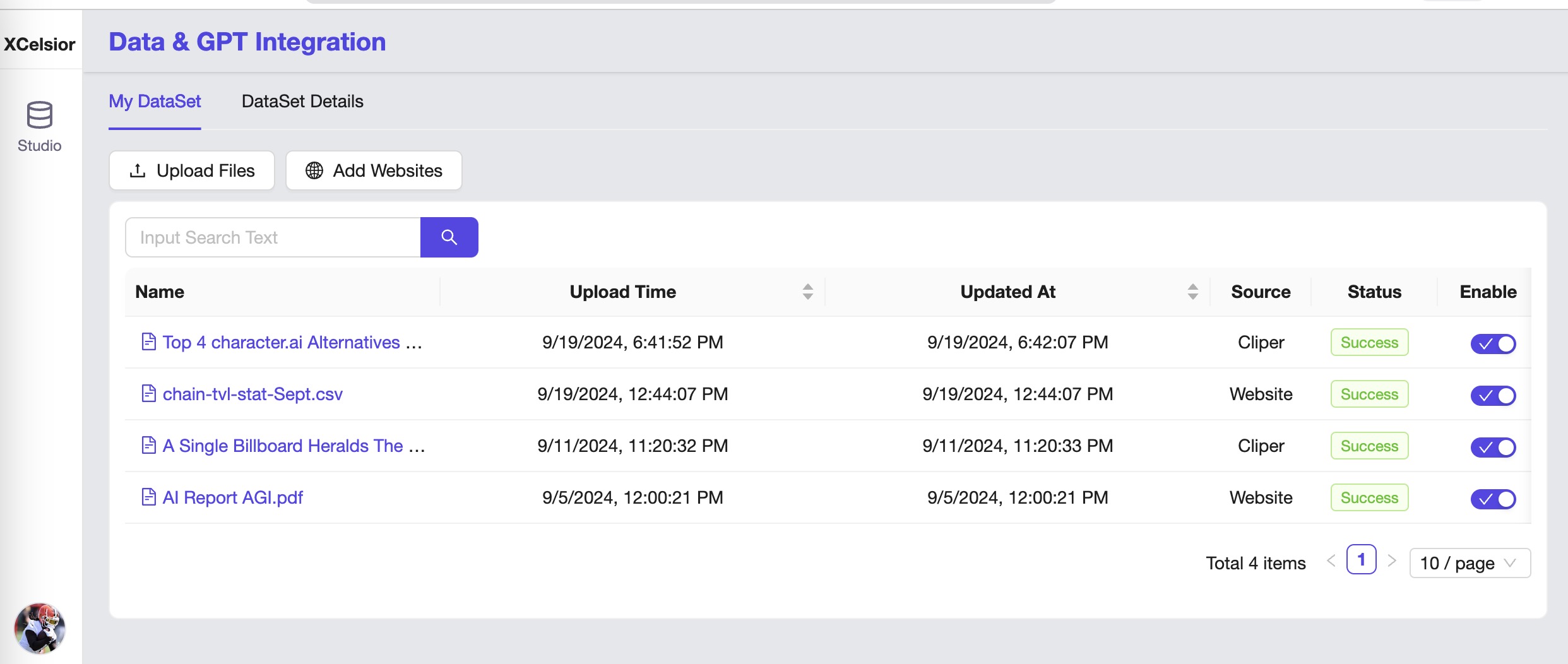
XCelsior Clipper is a powerful browser extension that allows you to seamlessly save and organize interesting content from the web directly to your XCelsior account. Enhance your productivity by integrating with **"XCelsior AI: GPT for Sheets™ with Gemini, OpenAI"** on Google Sheets to answer questions based on your saved documents and uploaded files.
## Key Features
### Web Clipper
Capture ideas and inspiration from anywhere with ease. Save articles, web pages, and screenshots directly to XCelsior.ai.
### Save What Matters
Clip web pages, articles, or PDFs and store them in XCelsior.ai. Screen capture full pages or just the parts you want—without distracting ads and sidebars.
### Customize Your Clips
Take a screenshot of a web page, then add highlights, text, and other annotations. With Web Clipper, you can ensure that what’s important is clear at a glance.
### Integration with Google Sheets
After clipping to XCelsior.ai, utilize the **"XCelsior AI: GPT for Sheets™ with Gemini, OpenAI"** Google Sheets add-on to answer questions based on the documents you’ve clipped and files you’ve uploaded.
# Chrome Extension: Clipper Installation
1. [**Visit Install URL**](https://chromewebstore.google.com/detail/hbncobfkgmkiippmbijffhlfmicbdobb)
2. **Add to Chrome**: You will be redirected to the Chrome Web Store page for XCelsiorAI Clipper. Click on the `Add to Chrome` button.
3. **Confirm Installation**: A dialog box will appear asking for confirmation. Click `Add extension` to install XCelsiorAI Clipper.
4. **Extension Installed**: Once the installation is complete, you will see a notification, and the XCelsiorAI Clipper icon will appear in the Chrome toolbar.
Watch [this video](https://www.youtube.com/watch?v=UUcSiP6pzlk) after installed for detail instruction
# Upload File
# FAQ
## Issue: Data Loss Due to Formula Reload
### Problem
Google Sheets automatically reloads all formulas every few hours. This includes formulas and can lead to unexpected costs and result changes.
**Important Note:** Sorting, filtering, moving columns or rows will reload ALL formulas and generate unexpected costs.
### Solution (Workaround)
Replace formulas with values before moving things around or when you finish your work.
### Steps to Replace Formulas with Values
1. Select the cells containing the formulas you want to replace.
2. Copy the selected cells (Ctrl+C or Cmd+C).
3. Right-click on the selected cells and choose "Paste special" > "Values only".
By following these steps, you can prevent Google Sheets from reloading formulas and incurring unexpected costs.
# Support
Welcome to the XCelsior support page! We're here to assist you with any questions, issues, or concerns you may have while using our AI-powered spreadsheet tool. Our team is dedicated to providing you with the best possible support experience.
## How to Get Support
If you need help or have a question, here are the ways you can reach out to our support team:
* **Email:** Contact us at
* **Knowledge Base:** Visit our [Knowledge Base](https://doc.xcelsior.ai/faq) for FAQs and troubleshooting guides
* **Community Forum:** Join our [Community Forum](https://doc.xcelsior.ai/contact) to interact with other users and get help
* **Live Chat:** Chat with a support representative directly on our website during business hours
## Support Hours
Our support team is available to assist you during the following hours:
* Monday to Friday: 9:00 AM - 6:00 PM (GMT)
## Response Time
We strive to respond to all support inquiries within 24 hours. For urgent matters, please indicate the priority in your message, and we will address it promptly.
Thank you for choosing XCelsior. We're here to help you succeed!
# Changelog
## 2024-10-09(v0.5.0)
* **Added Support for Multiple Data Sources**:
* New integrations include Perplexity and CMC.
* Existing support for Yahoo Finance, Google Search, and private data sources remains.
* **Enhanced CMC Data Source**:
* Now supports additional fields: market cap, FDV, circulating supply, and total supply.
* **Expanded Finance Templates**:
* Added more finance templates and use cases to the public template sheet.
* **Fixed and Improved Installation Instructions**:
* Enhanced guidance provided after installing the extension.
## 2024-09-20(v0.4.0)
* **Added Support for Yahoo Finance as Data Source**
* **Added New Functions: xsummarize**
* **Improved Menu Instructions**
## 2024-09-02(v0.3.0)
* **Added confidence level and view cell details for reference**
* **Improved Functions Docs**
## 2024-08-22(v0.2.0
* **Rename functions and docs**
* **Added new functions**:
* xask, xfetch, xtranslate, xclassify, xtag, xcall, xdef
## 2024-08-12(v0.1.0)
* **Add Functions : xc\_ask**
# Legal
# Privacy Policy
## IN SHORT
**XCelsior AI: GPT for Sheets™ with ChatGPT, Gemini** (XCelsior or XCelsior.ai) does not store your data (inputs, clicks, or drive files). It stays on Google’s servers. Granting us access to your data does not allow us to access it offline. This access is only used for displaying your information on the app and for taking actions on your behalf. All actions performed come from you.
The only information we store from your Google account is your name, last name, profile picture, and email.
We do not share your data with any third party for commercial purposes.
The app’s use and transfer of information received from Google APIs adheres to the Google API Services User Data Policy, including the Limited Use requirements.
At XCelsior.ai, we recognize that privacy is important. This Policy applies to all of the products, services, and websites offered by Fastest.ai Inc. In addition, where more detailed information is needed to explain our privacy practices, we post separate privacy notices to describe how particular services process personal information, which are accessible from the [here](https://doc.xcelsior.ai/legal/privacy-policy).
The company adheres to the Swiss safe harbour privacy principles of Notice, Choice, Onward Transfer, Security, Data Integrity, Access, and Enforcement.
If you have any questions about this Policy, please feel free to contact us through our website or write to us at Privacy Matters, c/o Fastest.ai, 727 Clementi West Street 2 #01-280, Singapore 120727.
## Information We Collect and How We Use It
In order to provide our full range of services, we may collect the following types of information:
### Non-sensitive Scopes
* **Profile Information (via .../auth/userinfo.profile)**: We access your personal info, including any personal info you've made publicly available, to display your name, last name, profile picture, and email within the app.
* **auth/userinfo.email (via .../auth/userinfo.email)**: We see your primary Google Account email address.
XCelsior.ai only processes personal information for the purposes described in the applicable Privacy Policy and/or privacy notice for specific services. In addition to the above, such purposes include:
* Providing our products and services to users, including the display of customized content;
* Auditing, research, and analysis in order to maintain, protect, and improve our services;
* Ensuring the technical functioning of our network;
* Developing new services, such as:
* Custom GPT
* Custom knowledge management.
### Sensitive Scopes
* **External Service Connection (via .../auth/script.external\_request)**: Connect to an external service.This is used solely to improve application functionality.
* **Third-Party Web Content (via .../auth/script.container.ui)**: Display and run third-party web content in prompts and sidebars inside Google applications. This is strictly for enhancing user experience within the app.
* **Google Sheets (via .../auth/spreadsheets)**: We access, edit, create, and delete all your Google Sheets spreadsheets to enable advanced spreadsheet functionalities, including data manipulation and automation within your Google Sheets. This access is strictly for providing and improving application functionality.
## How We Use the Data
XCelsior.ai accesses sheet content to provide valuable answers and detailed information. This is achieved by leveraging Large Language Models (LLMs) and external systems, displayed through sidebars, pop-ups, and external websites.
We use these scopes to deliver a seamless, automated, and intelligent data management experience within Google Sheets. These permissions are essential for our advanced features, ensuring productivity and efficiency while adhering to robust security standards.
### Specific Uses Example:
* **Question Answering**: Reads spreadsheet data to provide precise answers using the XASK function.
* **Custom Function Definition & Invocation**: Allows users to define (XDEF) and call (XCALL) custom functions that manipulate spreadsheet data.
* **Table Merging**: Reads and edits multiple tables to merge them seamlessly using the XMERGE\_table function.
* **Other Formula Functions**
## Information You Provide
When you sign up for an account or other service or promotion that requires registration, we ask you for personal information (such as your name and email address). For certain services, such as our advanced features (custom GPT and custom knowledge management), we also request credit card or other payment account information, which we maintain in encrypted form on secure servers.
We may combine the information you submit under your account with information from other services or third parties to provide you with a better experience and to improve the quality of our services.
## Cookies
When you visit XCelsior.ai, we send one or more cookies—a small file containing a string of characters—to your computer that uniquely identifies your browser. We use cookies to improve the quality of our service by storing user preferences and tracking user trends, such as how people search.
## Log Information
When you use XCelsior.ai services, our servers automatically record information that your browser sends whenever you visit a website. These server logs may include information such as your web request, Internet Protocol address, browser type, browser language, the date and time of your request, and one or more cookies that may uniquely identify your browser.
## User Communications
When you send email or other communication to XCelsior.ai, we may retain those communications in order to process your inquiries, respond to your requests, and improve our services.
## Data Shared with Third Parties(only limited to LLMs) and Why
We use third-party services, specifically Large Language Models (LLMs) such as Gemini by Google and ChatGPT by OpenAI, only to process and improve our features. These third parties help us provide better responses and improve our application’s functionality only.
* **Data range**: Those data shared is only limited when you called the custom formula function we provided in specific spreadsheet cells. This access is strictly for providing and improving application functionality.
* **Purpose**: The data is shared strictly to provide or improve our application's functionality. We do not share data for any other purposes.
* **Transparency**: The data shared with these models is always clearly visible in the context of the conversation so you can see what will be shared with the model. We implement robust security measures to protect your data during transfer to these third parties.
And these third parties are only limited to LLMs provider such as Gemini by Google and ChatGPT by OpenAI.
## Enforcement
XCelsior.ai regularly reviews its compliance with this Policy. Please feel free to direct any questions or concerns regarding this Policy or XCelsior.ai's treatment of personal information by contacting us through this website or by writing to us at Privacy Matters, c/o Fastest.ai, 727 Clementi West Street 2 #01-280, Singapore 120727. When we receive formal written complaints at this address, it is XCelsior.ai's policy to contact the complaining user regarding his or her concerns. We will cooperate with the appropriate regulatory authorities, including local data protection authorities, to resolve any complaints regarding the transfer of personal data that cannot be resolved between XCelsior.ai and an individual.
## Changes to This Policy
Please note that this Privacy Policy may change from time to time. We will not reduce your rights under this Policy without your explicit consent, and we expect most such changes will be minor. Regardless, we will post any Policy changes on this page and, if the changes are significant, we will provide a more prominent notice (including, for certain services, email notification of Policy changes). Each version of this Policy will be identified at the top of the page by its effective date, and we will also keep prior versions of this Privacy Policy in an archive for your review.
If you have any additional questions or concerns about this Policy, please feel free to contact us any time through this website or at Privacy Matters, c/o Fastest.ai, 727 Clementi West Street 2 #01-280, Singapore 120727.
# Privacy Policy Clipper
### Introduction
Welcome to XCelsior Clipper! This privacy policy explains how we collect, use, and share your personal information when you use our browser extension, XCelsior Clipper, which is designed to help you save articles, web pages, and screenshots directly to your XCelsior account (). By using our extension, you agree to the collection and use of information in accordance with this policy.
### Information We Collect
We only ask for personal information when we truly need it to provide the service to you. We collect it by fair and lawful means, with your knowledge and consent. The types of information we collect include:
* **Personal Information:** When you register or log into your XCelsior account, we may collect personal information such as your name and email address as authorized in your Google Apps profile settings. We do not collect passwords.
* **Usage Data:** We collect information on how you interact with the extension, such as the pages you save and annotations you make.
### Data Shared with Third Parties
We do not share any data with third parties until the clipper web data is used for user's question answering and the user agrees to use another Google Workspace Marketplace add-on: **XCelsior AI: GPT for Sheets™ with Gemini, OpenAI**.
#### Data Shared with Third Parties (Limited to LLMs) and Why
We use third-party services, specifically Large Language Models (LLMs) such as Gemini by Google and ChatGPT by OpenAI, to process and improve our features. These third parties help us provide better responses and improve our application's functionality.
* **Data Range:** The data shared is only limited to when you call the custom formula function we provided in specific spreadsheet cells. This access is strictly for providing and improving application functionality.
* **Purpose:** The data is shared strictly to provide or improve our application's functionality. We do not share data for any other purposes.
* **Transparency:** The data shared with these models is always clearly visible in the context of the conversation so you can see what will be shared with the model. We implement robust security measures to protect your data during transfer to these third parties.
These third parties are only limited to LLM providers such as Gemini by Google and ChatGPT by OpenAI.
### Permissions We Require
To provide you with the best experience, XCelsior Clipper requires the following permissions:
* `webNavigation`
* `activeTab`
* `contextMenus`
* `background`
* `webRequest`
* `storage`
* `tabs`
* `sidePanel`
* `notifications`
* `host permission(for all websites)`
These permissions are necessary for the extension to function properly and provide its core features.
### How We Use Your Information
We use the collected information for the following purposes:
* **To Provide and Maintain the Service:** To ensure the proper functioning of the extension and improve its features.
* **To Personalize Your Experience:** To customize the content and features according to your preferences.
* **To Communicate With You:** To send you updates, notifications, and other information related to the service.
* **To Improve Our Service:** To analyze usage patterns and improve the extension's performance and usability.
* **To Ensure Security:** To protect against misuse and unauthorized access.
### Security
We take reasonable steps to protect the personal data provided via the extension from loss, misuse, and unauthorized access, disclosure, alteration, or destruction. However, no internet or email transmission is ever fully secure or error-free. Therefore, you should take special care in deciding what information you send to us via email.
### Data Retention
We only retain collected information for as long as necessary to provide you with your requested service. What data we store, we protect within commercially acceptable means to prevent loss and theft, as well as unauthorized access, disclosure, copying, use, or modification.
### Contact Us
You have the right to access, update, or delete your personal information at any time. If you need help accessing your account or have any questions about your privacy or this statement, please contact us at .
### Changes to This Privacy Policy
We may update our Privacy Policy from time to time. We will notify you of any changes by posting the new Privacy Policy on this page. You are advised to review this Privacy Policy periodically for any changes.
# Terms of Service
**Xcelsior Terms of Service**
1. **Your relationship with the company**
1.1 Your use of the company’s products, software, services, and websites (referred to collectively as the “Services” in this document and excluding any services provided to you by the company under a separate written agreement) is subject to the terms of a legal agreement between you and the company. “The company” means Fastest.ai Inc., 727 Clementi West Street 2 #01-280, Singapore 120727. This document explains how the agreement is made up and sets out some of the terms of that agreement.
1.2 Unless otherwise agreed in writing with the company, your agreement with the company will always include, at a minimum, the terms and conditions set out in this document. These are referred to below as the “Universal Terms”.
1.3 Your agreement with the company will also include the terms of any Legal Notices applicable to the Services, in addition to the Universal Terms. All of these are referred to below as the “Additional Terms”. Where Additional Terms apply to a Service, these will be accessible for you to read either within, or through your use of, that Service.
1.4 The Universal Terms, together with the Additional Terms, form a legally binding agreement between you and the company in relation to your use of the Services. It is important that you take the time to read them carefully. Collectively, this legal agreement is referred to below as the “Terms”.
1.5 If there is any contradiction between what the Additional Terms say and what the Universal Terms say, then the Additional Terms shall take precedence in relation to that Service.
2. **Accepting the Terms**
2.1 In order to use the Services, you must first agree to the Terms. You may not use the Services if you do not accept the Terms.
2.2 You can accept the Terms by:
(A) clicking to accept or agree to the Terms, where this option is made available to you by the company in the user interface for any Service; or
(B) by actually using the Services. In this case, you understand and agree that the company will treat your use of the Services as acceptance of the Terms from that point onwards.
2.3 You may not use the Services and may not accept the Terms if (a) you are not of legal age to form a binding contract with the company, or (b) you are a person barred from receiving the Services under the laws of the United States, Switzerland, or other countries including the country in which you are resident or from which you use the Services.
2.4 Before you continue, you should print off or save a local copy of the Universal Terms for your records.
3. **Language of the Terms**
3.1 Where the company has provided you with a translation of the English language version of the Terms, then you agree that the translation is provided for your convenience only and that the English language versions of the Terms will govern your relationship with the company.
3.2 If there is any contradiction between what the English language version of the Terms says and what a translation says, then the English language version shall take precedence.
4. **Provision of the Services by the company**
4.1 The company has subsidiaries and affiliated legal entities around the world (“Subsidiaries and Affiliates”). Sometimes, these companies will be providing the Services to you on behalf of the company itself. You acknowledge and agree that Subsidiaries and Affiliates will be entitled to provide the Services to you.
4.2 The company is constantly innovating in order to provide the best possible experience for its users. You acknowledge and agree that the form and nature of the Services which the company provides may change from time to time without prior notice to you.
4.3 As part of this continuing innovation, you acknowledge and agree that the company may stop (permanently or temporarily) providing the Services (or any features within the Services) to you or to users generally at the company’s sole discretion, without prior notice to you. You may stop using the Services at any time. You do not need to specifically inform the company when you stop using the Services.
4.4 You acknowledge and agree that if the company disables access to your account, you may be prevented from accessing the Services, your account details, or any files or other content which is contained in your account.
4.5 You acknowledge and agree that while the company may not currently have set a fixed upper limit on the number of transmissions you may send or receive through the Services or on the amount of storage space used for the provision of any Service, such fixed upper limits may be set by the company at any time, at the company’s discretion.
5. **Use of the Services by you**
5.1 In order to access certain Services, you may be required to provide information about yourself (such as identification or contact details) as part of the registration process for the Service, or as part of your continued use of the Services. You agree that any registration information you give to the company will always be accurate, correct, and up to date.
5.2 You agree to use the Services only for purposes that are permitted by (a) the Terms and (b) any applicable law, regulation, or generally accepted practices or guidelines in the relevant jurisdictions (including any laws regarding the export of data or software to and from the United States, Switzerland, or other relevant countries).
5.3 You agree not to access (or attempt to access) any of the Services by any means other than through the interface that is provided by the company unless you have been specifically allowed to do so in a separate agreement with the company.
5.4 You agree that you will not engage in any activity that interferes with or disrupts the Services (or the servers and networks which are connected to the Services).
5.5 Unless you have been specifically permitted to do so in a separate agreement with the company, you agree that you will not reproduce, duplicate, copy, sell, trade, or resell the Services for any purpose.
5.6 You agree that you are solely responsible for (and that the company has no responsibility to you or to any third party for) any breach of your obligations under the Terms and for the consequences (including any loss or damage which the company may suffer) of any such breach.
6. **Your passwords and account security**
6.1 You agree and understand that you are responsible for maintaining the confidentiality of passwords associated with any account you use to access the Services.
6.2 Accordingly, you agree that you will be solely responsible to the company for all activities that occur under your account.
6.3 If you become aware of any unauthorized use of your password or of your account, you agree to notify the company immediately at .
7. **Privacy and your personal information**
7.1 For information about the company’s data protection practices, please read the company’s privacy policy at . This policy explains how the company treats your personal information, and protects your privacy, when you use the Services.
7.2 You agree to the use of your data in accordance with the company’s privacy policies.
8. **Content in the Services**
8.1 You understand that all information (such as data files, written text, computer software, music, audio files or other sounds, photographs, videos, or other images) which you may have access to as part of, or through your use of, the Services are the sole responsibility of the person from which such content originated. All such information is referred to below as the “Content”.
8.2 You should be aware that Content presented to you as part of the Services, including but not limited to advertisements in the Services and sponsored Content within the Services may be protected by intellectual property rights which are owned by the sponsors or advertisers who provide that Content to the company (or by other persons or companies on their behalf). You may not modify, rent, lease, loan, sell, distribute or create derivative works based on this Content (either in whole or in part) unless you have been specifically told that you may do so by the company or by the owners of that Content, in a separate agreement.
8.3 The company reserves the right (but shall have no obligation) to pre-screen, review, flag, filter, modify, refuse or remove any or all Content from any Service. For some of the Services, the company may provide tools to filter out explicit sexual content. In addition, there are commercially available services and software to limit access to material that you may find objectionable.
8.4 You understand that by using the Services you may be exposed to Content that you may find offensive, indecent or objectionable and that, in this respect, you use the Services at your own risk.
8.5 You agree that you are solely responsible for (and that the company has no responsibility to you or to any third party for) any Content that you create, transmit, or display while using the Services and for the consequences of your actions (including any loss or damage which the company may suffer) by doing so.
9. **Proprietary rights**
9.1 You acknowledge and agree that the company (or the company’s licensors) own all legal right, title, and interest in and to the Services, including any intellectual property rights which subsist in the Services (whether those rights happen to be registered or not, and wherever in the world those rights may exist). You further acknowledge that the Services may contain information which is designated confidential by the company and that you shall not disclose such information without the company’s prior written consent.
9.2 Unless you have agreed otherwise in writing with the company, nothing in the Terms gives you a right to use any of the company’s trade names, trademarks, service marks, logos, domain names, and other distinctive brand features.
9.3 If you have been given an explicit right to use any of these brand features in a separate written agreement with the company, then you agree that your use of such features shall be in compliance with that agreement, any applicable provisions of the Terms, and the company's brand feature use guidelines as updated from time to time. These guidelines can be viewed online at (or such other URL as the company may provide for this purpose from time to time).
9.4 Other than the limited license set forth in Section 11, the company acknowledges and agrees that it obtains no right, title, or interest from you (or your licensors) under these Terms in or to any Content that you submit, post, transmit, or display on, or through, the Services, including any intellectual property rights which subsist in that Content (whether those rights happen to be registered or not, and wherever in the world those rights may exist). Unless you have agreed otherwise in writing with the company, you agree that you are responsible for protecting and enforcing those rights and that the company has no obligation to do so on your behalf.
9.5 You agree that you shall not remove, obscure, or alter any proprietary rights notices (including copyright and trademark notices) which may be affixed to or contained within the Services.
9.6 Unless you have been expressly authorized to do so in writing by the company, you agree that in using the Services, you will not use any trademark, service mark, trade name,
# Feedback
We value your feedback! Your input helps us improve and enhance the XCelsior experience. Whether you have suggestions, feature requests, or encountered any issues, we want to hear from you.
## How to Provide Feedback
* **Email:** Send us an email at
## What to Include in Your Feedback
When providing feedback, please include the following details:
* Detailed description of the issue or suggestion
* Steps to reproduce the problem (if applicable)
* Any relevant screenshots or examples
Your feedback is instrumental in shaping the future of XCelsior. Thank you for taking the time to help us improve!
# Contact Us
You can reach us on the following platforms:
* **Email:**
* **Linkedin:** [XCelsiorAI](https://www.linkedin.com/in/xcelsior-ai-22b8b23266)
* **Discord:** [XCelsiorAI](https://discord.gg/cRSPT6RYJ3)
* **Medium:** [XCelsiorAI](https://medium.com/@XCelsiorAI)
* **Twitter:** [XCelsiorAI](https://twitter.com/XCelsiorAI)
* **Telegram:** [XCelsiorAI](https://t.me/XCelsiorAI)
Feel free to connect with us on any of these platforms for inquiries, feedback, or support.